JABLOCOM GDP-04 TUTORIAL
Instructions to unlock JABLOCOM GDP-04 by code manually
1.- Once you receive the unlock code, enter it in the following way, put an " L " before the code and a " 0 " after it, and push Ok.
2.- The typed code will be: L+CODE+0 (not type the character +).
Instructions to unlock JABLOCOM GDP-04 by cable
1.- Open UboxPro. Select "cable unlock" and search for "Jablocom
GDP04" model.
- Download the drivers and save it.
- Extract all files within the package.
- Download the drivers and save it.
- Extract all files within the package.

|
2. Connect the device to the USB. Windows will try to install drivers, but it will
be erroneous.
3. Go to start and open 'Control Panel'. Then open the 'Devices Manager'.
- Look for GDP04 device and select it. Click on right mouse button and click at 'update device driver'. (fig.2)
- Select "Search software at the computer". Click on browse and select the folder "driver_GDP_04" inside the package extracted previously.(fig.3)
- Windows will require your confirmation before install it.
- Wait a few seconds. Installation will finish.
3. Go to start and open 'Control Panel'. Then open the 'Devices Manager'.
- Look for GDP04 device and select it. Click on right mouse button and click at 'update device driver'. (fig.2)
- Select "Search software at the computer". Click on browse and select the folder "driver_GDP_04" inside the package extracted previously.(fig.3)
- Windows will require your confirmation before install it.
- Wait a few seconds. Installation will finish.
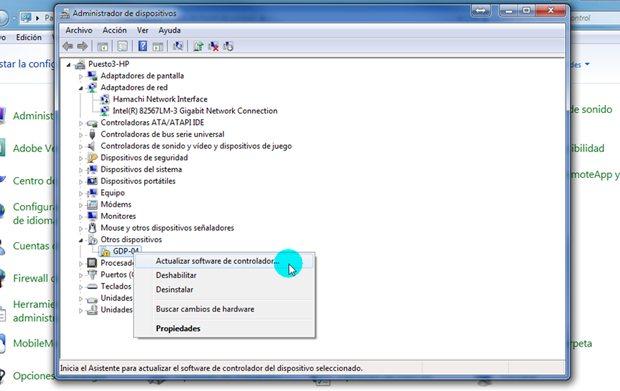 fig.2 fig.2 |
 fig.3 fig.3
|
4. Execute "install-filter-win.exe" (fig.4). It is inside the package
extracted previously.
- At the first stage, select "install a device filter" (fig.5). Click
Next.
- Look and select the GDP-04 device at the list. Press Install.
- Close the program.
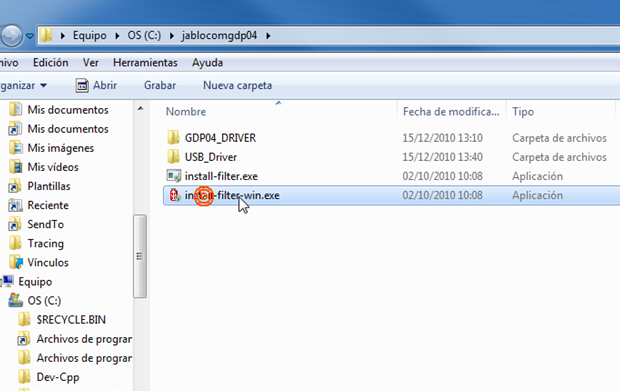 fig.4 fig.4
|
 fig.5 fig.5
|
5. Go back to the Devices Manager.
- Press 'Search Changes' (fig.6).
- Look for GDP-04 device again. Select it and, after press right mouse button, choose Unistall. Choose the option 'Delete software controller' (fig.7), and finish.
- Press 'Search Changes' (fig.6).
- Look for GDP-04 device again. Select it and, after press right mouse button, choose Unistall. Choose the option 'Delete software controller' (fig.7), and finish.
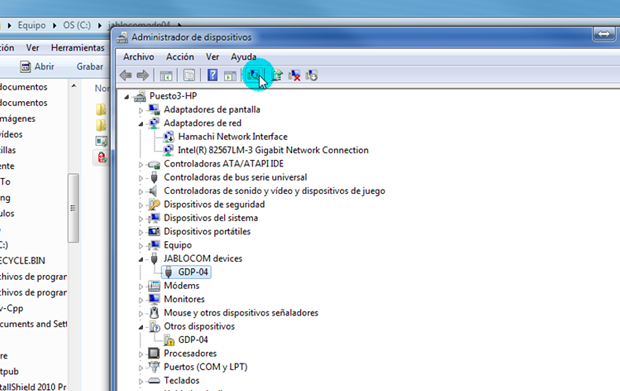 fig.6 fig.6 |
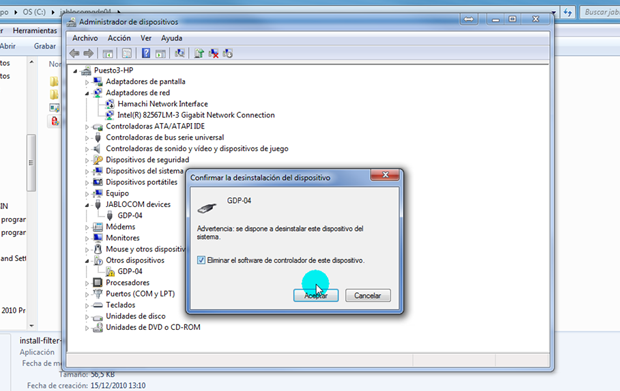 fig.7 fig.7
|
6. Press on 'Search changes' and then look for GDP04 device again. Select it. Click
on right mouse button and click at 'update device driver'. (fig.2)
- Select "Search software at the computer". Click on browse and select the folder "USB_driver" inside the package extracted previously.(fig.8)
- Follow the steps described before to install the drivers.
- Select "Search software at the computer". Click on browse and select the folder "USB_driver" inside the package extracted previously.(fig.8)
- Follow the steps described before to install the drivers.
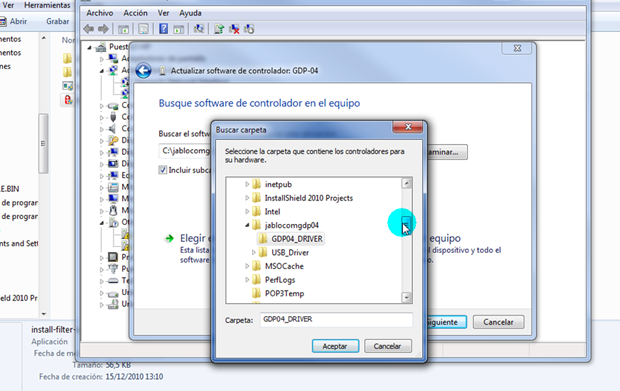 fig.8 fig.8 |
7. Go back to UboxPro. Disconnect the device from the USB and connect it again.
Wait for a few seconds. Windows will found it.
8. Now press at "Do job" button for unlock the device. Wait a few seconds. UboxPro will unlock it.
8. Now press at "Do job" button for unlock the device. Wait a few seconds. UboxPro will unlock it.
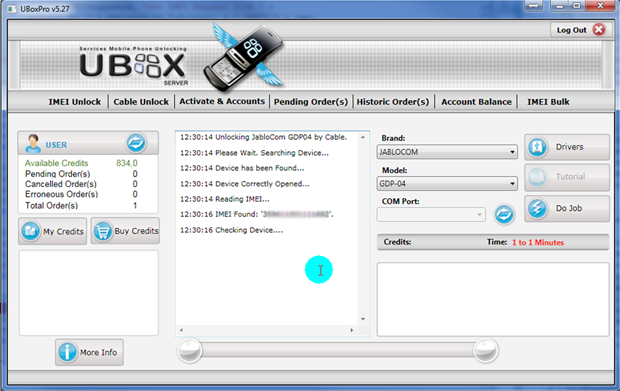 fig.9 fig.9
|
9. Congratulations. Your device has been unlocked.